
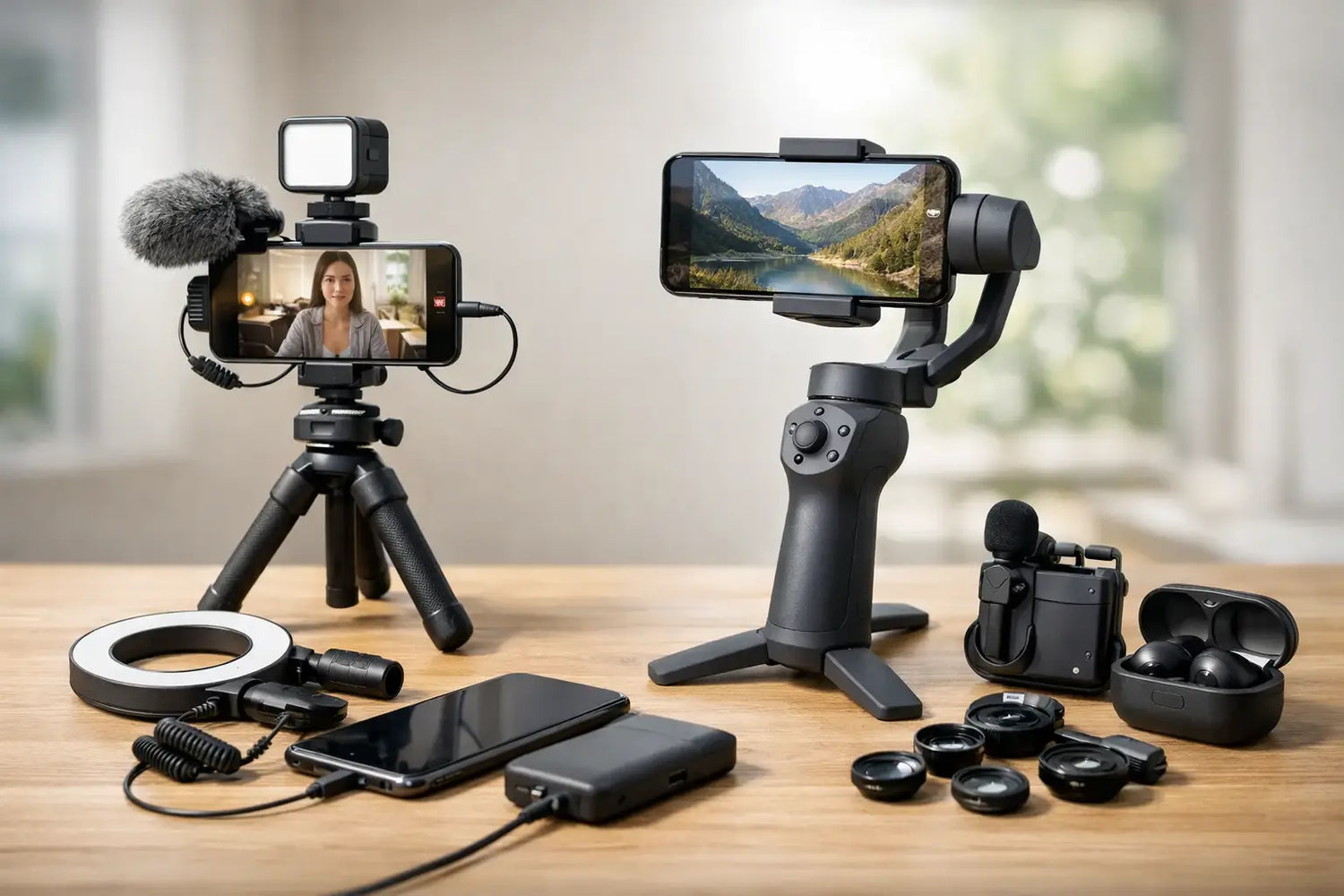
One shaky clip, muddy audio track, or dim selfie video can make great ideas look way less polished than they deserve. That is exactly why the right phone accessories for creators matter - not because you need a giant studio setup, but because a few smart upgrades can make your content look cleaner, sound better, and feel more intentional fast.
For most creators, the phone is already the camera, editing station, posting tool, and backup office. The trick is not buying every gadget that pops up on your feed at 2 a.m. with a dramatic before-and-after video. It is choosing accessories that solve actual problems in your workflow.
What phone accessories for creators actually help?
If you make short-form video, vlogs, livestreams, product demos, tutorials, or social posts, four things affect quality more than almost anything else: stability, lighting, audio, and power. A cool-looking accessory that does nothing for one of those areas is usually a nice-to-have, not a must-have.
That is good news if you are building a setup on a budget. You do not need a giant cart full of gear to make your phone content look better. You need accessories that remove friction so you can shoot more often and spend less time fixing obvious problems later.
Start with stability before anything else
A tripod or phone holder is usually the first upgrade worth making. Handheld footage can work when you want energy and movement, but random shake makes even fun content feel messy. A simple stand instantly improves talking-head videos, overhead shots, product clips, and livestreams.
If you film at a desk, a compact stand is often enough. It keeps framing consistent and makes recording feel easier, which matters more than people think. The less setup drama you have, the more likely you are to actually hit record.
If you shoot while walking, a handheld grip or gimbal can help. But this is one of those it-depends purchases. A gimbal is great for smooth motion and polished movement, but it is not always essential for creators making quick reels, unboxings, or tutorials at home. If your budget is tight, start with a sturdy mount before jumping to motion gear.
When a gimbal is worth it
A gimbal makes the most sense if your content includes travel footage, action shots, real estate walkthroughs, event clips, or cinematic b-roll. If most of your videos happen in one room with you facing the camera, that money might be better spent on audio or lighting.
Good lighting beats an expensive phone upgrade
People love obsessing over camera specs, but lighting is the real cheat code. Even a strong phone camera struggles in bad light, while a modest phone can look surprisingly sharp with the right setup.
Ring lights are popular for a reason. They are easy, flattering, and beginner-friendly. For creators filming beauty content, livestreams, reactions, or face-to-camera updates, a ring light is a very practical choice. It gives your face consistent light without requiring much technical know-how.
That said, ring lights are not magic. They can sometimes look a little flat or create an overly obvious catchlight effect. If you want more depth, small LED panel lights often give you more control. They work especially well for product shots, desk setups, food content, and moody background scenes.
Ring light or LED panel?
A ring light is the easy pick for front-facing content. An LED panel is often better if you want more directional light or need to shape a scene. Some creators eventually use both - one as the main light, one as a fill or background accent.
If you are only buying one lighting accessory, think about what you film most often, not what looks coolest in someone else’s studio tour.
Audio is the upgrade people notice fastest
Viewers will forgive a lot before they forgive bad sound. Slightly imperfect video can still feel watchable. Crackly, distant, or echo-heavy audio makes people leave fast.
That is why an external microphone is often one of the best phone accessories for creators, especially if you talk on camera. A clip-on lav mic works well for tutorials, interviews, and direct-to-camera videos. A small directional mic can be better when you want improved sound without clipping something to your shirt every time.
Wireless mics are especially useful if you move around while filming. They give you more freedom and usually sound much cleaner than the phone’s built-in mic from a distance. The trade-off is price. They cost more, and cheaper sets can be inconsistent with battery life or signal quality.
If you mostly film at arm’s length in a quiet room, a budget wired solution may be plenty. If you shoot workouts, cooking demos, or active lifestyle content, wireless is a much bigger upgrade.
Power and storage are the boring heroes
Not glamorous. Very important. Recording video, running lights, editing clips, and posting on multiple apps drains battery fast. A portable charger or power bank is one of those accessories that feels optional until your phone dies halfway through the exact clip you finally nailed.
Fast charging matters too, especially for creators who shoot on the go. If your content happens outside, at events, while traveling, or between classes or work shifts, reliable backup power keeps your phone from becoming dead weight.
Storage is the other issue that sneaks up on people. High-res video eats space quickly. If your phone constantly runs low, your workflow gets annoying in a hurry. Depending on your device, that may mean using cloud storage, moving files often, or choosing accessories that support easier transfers and organization.
Mounts, grips, and little add-ons that make filming easier
Not every useful creator accessory is flashy. Sometimes the best upgrade is the one that makes setup less awkward.
A solid phone clamp matters because a weak one can slip, tilt, or make you constantly reframe. A grip can make handheld filming more comfortable and reduce accidental drops. A flexible mount can help with overhead shots, cooking videos, craft tutorials, or desk content where a standard tripod angle just does not cut it.
Remote shutters are another small win. They make solo filming easier and save you from rushing back into frame after tapping record. If you create alone, little conveniences like that can speed up your process more than you expect.
Build your setup based on the content you actually make
The smartest creator setup is not the biggest one. It is the one built around your format.
If you make talking-head videos, your best combo is probably a stand, a light, and a microphone. If you shoot product demos or unboxings, you may get more value from an overhead mount, LED lighting, and a clean tabletop setup. If you are outside a lot, power banks, portable mounts, and wind-resistant audio gear jump higher on the list.
This is where a lot of creators overspend. They buy for their fantasy content instead of their real content. It sounds funny, but it is true. If you have filmed 47 videos at your desk, you probably do not need to start with advanced motion gear meant for travel cinematography.
How to shop without wasting money
Affordable gear can absolutely do the job, but there is a difference between budget-friendly and disposable. Look for accessories with solid user ratings, clear compatibility with your phone, and build quality that does not feel like it will snap during week two.
Be especially careful with accessories that promise everything in one product. Multi-use tools can be convenient, but sometimes they are mediocre at all their jobs. A light that is also a charger that is also a speaker that is also a stand sounds clever until every feature is just okay.
Creators usually get better results by choosing a few focused accessories that solve one problem well. That also makes upgrading easier later.
The best phone accessories for creators are the ones you will use
That is the real filter. Not the trendiest gear. Not the item with the flashiest product video. The best accessory is the one that fits your content style, your budget, and your routine enough that it becomes part of your normal process.
A good stand gets used every week. A reliable light saves bad filming days. A decent mic makes people stay longer. A power bank rescues shoots that would have been lost. Those upgrades are not just nice extras - they help you create more consistently, and consistency is where content starts getting traction.
If you are building your setup piece by piece, keep it simple and useful. Start with the problem that annoys you most every time you film, fix that first, and let your gear grow with your content instead of racing ahead of it.

Commenta
Questo sito è protetto da hCaptcha e applica le Norme sulla privacy e i Termini di servizio di hCaptcha.